
The Python method that tells you which posts to optimize first to get more clicks without publishing more content
Google Search Console CTR optimization is the fastest way to turn impressions into clicks without publishing more content. There is a kind of traffic loss that hurts more than having no traffic.
It is the traffic you already have. You can often optimize existing pages instead of publishing more, and the wins show up faster.
Google is already showing your pages. You are getting impressions. You are sitting close to page one. And still, people do not click. Not because your content is bad, but because your result is not winning the click.
That is exactly what I found on my site with a simple experiment: I exported two files from Google Search Console, ran a small Python script, and within minutes I had the truth in plain numbers. No opinions. No guessing. No vibes.
What you need (only 2 exports)
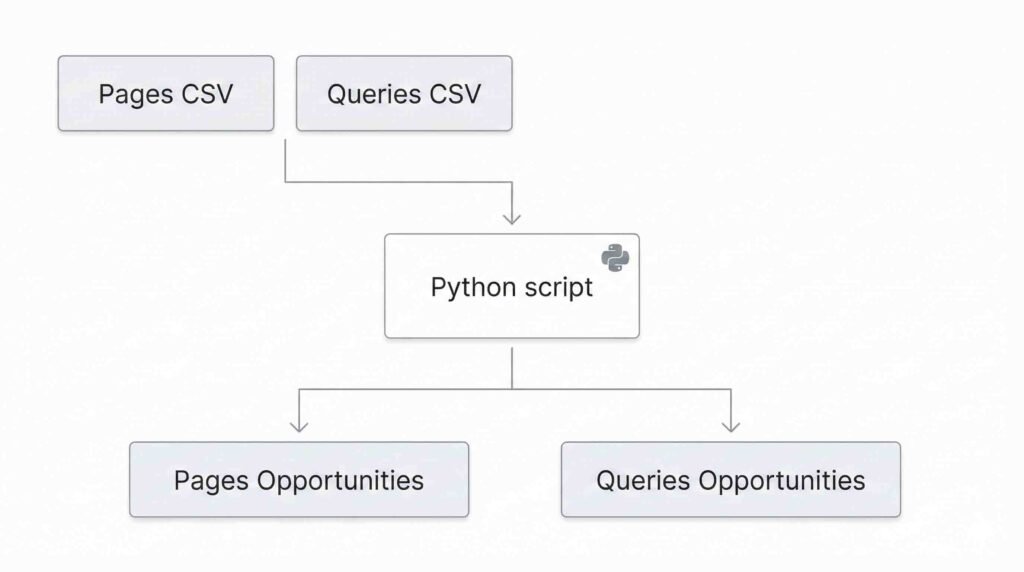
From Google Search Console export: Performance report in Google Search Console
- Page
- Queries
Then the CTR Lab script does what most people never do: it prioritizes by impact. It tells you which URL is losing clicks right now and which pages deserve your attention first.
What the script gives you and why it is gold
CTR Lab produces two reports.
1) Pages opportunities report
It answers:
Which URLs are getting a lot of impressions, have decent positions, but low CTR?
Translation: Google is giving you a chance. You are losing the click.
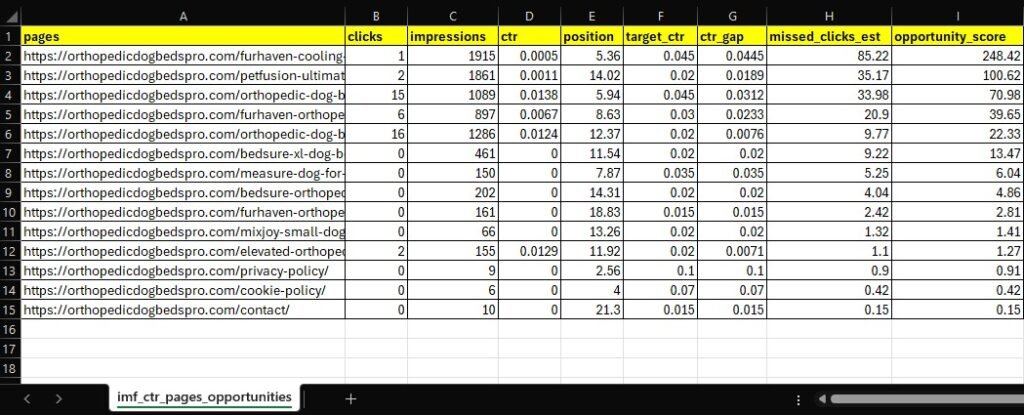
2) Queries opportunities report
It answers:
What exact phrases people type when Google shows your site, but they still do not choose you?
Translation: sometimes your article is fine. The problem is intent mismatch. You are showing up for a query where your snippet looks out of place.
A real example from my site
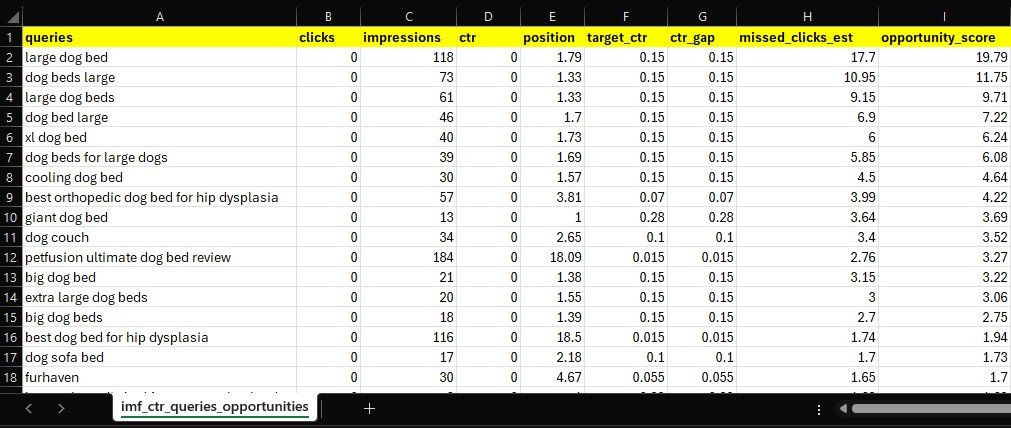
When I ran CTR Lab on orthopedicdogbedspro.com, the report instantly flagged two URLs.
1) Furhaven Cooling Gel Dog Bed Review
URL:
https://orthopedicdogbedspro.com/furhaven-cooling-gel-dog-bed-review/
Report signals:
- Average position: 5.36
- Impressions: 1,915
- CTR: 0.05%
If you are near the top 5 and almost nobody clicks, the problem is rarely “write more”. The problem is usually the same:
Your result is visible, but it does not win the click.
At this stage you do not rewrite the whole post first. You optimize what Google shows on the results page:
- SEO title
- Meta description
- The first visible block of the article
That is where clicks are won or lost. If you want the full framework behind those updates, see how to structure an SEO article that ranks.
2) PetFusion Ultimate Dog Bed Review
URL:
https://orthopedicdogbedspro.com/petfusion-ultimate-dog-bed-review/
Report signals:
- Average position: 14.02
- Impressions: 1,861
- CTR: 0.11%
This is a different kind of opportunity. You are not in the top 5, but you are close enough that a smart update can push you into the zone where traffic changes fast.
Note: orthopedicdogbedspro.com is a new site, so rankings can move fast. The “position” you see in Google Search Console is an average over the selected date range, not a fixed spot. A page can show up in different positions depending on the query, location, device, and SERP features, so treat these numbers as directional signals, not permanent rankings.
How to read the report like someone who knows what they are doing
CTR Lab does not tell you “do SEO” like every generic guide. It tells you where the money is.
Case A: strong position, low CTR
This is the prize.
Rewriting the whole post is rarely the move. What matters first is winning the click.
Focus on these quick upgrades:
- the title angle
- the explicit benefit
- a meta description that promises the outcome
- an opening line that confirms user intent in seconds
Case B: very low position (20+)
Here CTR is not the main issue. Ranking and intent are. The report works as a warning: this URL is not competing where it should.
Case C: many queries with zero clicks
This is brutal because it reveals something most people never see:
Google connects your site to keywords you did not plan for.
That can be a gift or a trap.
If you rank for “large dog bed” with a single product review, the intent may not match. When intent does not match, users ignore you even if you show up.
The practical guide this system gives you
This method gives you a clear workflow for your posts and real user behavior:
- Fix the URLs that already have impressions and are close
- Use the queries report to align search intent
- For pages that are far down, treat them differently: keyword, structure, intent, competition
- Repeat weekly and compare movement, no guessing
- Internal linking audit script
This turns SEO into a process, not hope.
The best part
You do not need AI to find opportunities.
AI can help you write, yes. But the question “what do I optimize first” should come from your own data. When your data speaks, you stop wasting time.
🐍 Get the Python Script
Want to run this audit on your own site? I’ve made the code open-source.
You don’t need to be a developer to use it. Just export your GSC data, run the script, and get the opportunity_score calculated automatically.
💡 Pro Tip: Adapt it to your Niche The script uses a conservative baseline for expected CTR (e.g., 28% for Position 1). However, we know that a B2B query behaves differently than a local E-commerce search.
That’s why I didn’t lock the math inside a black box. You can open the file and adjust the target_ctr_for_position function (lines 5-18) to match your specific industry benchmarks. It’s fully customizable.
🚀 Want the results, but not the coding?
I understand that setting up Python environments isn’t for everyone. If you want to see exactly how much traffic you’re leaving on the table without touching a terminal:
I’ll run the audit for you.
Send me a message. I’ll process your GSC data through my custom algorithm and send you back the Opportunity Score Report with your top 5 “quick wins”, completely free.
🔒 Privacy Note: I do not need access to your Google Search Console account. You simply send the exported CSV files. Your data remains yours.